Interruption Handling
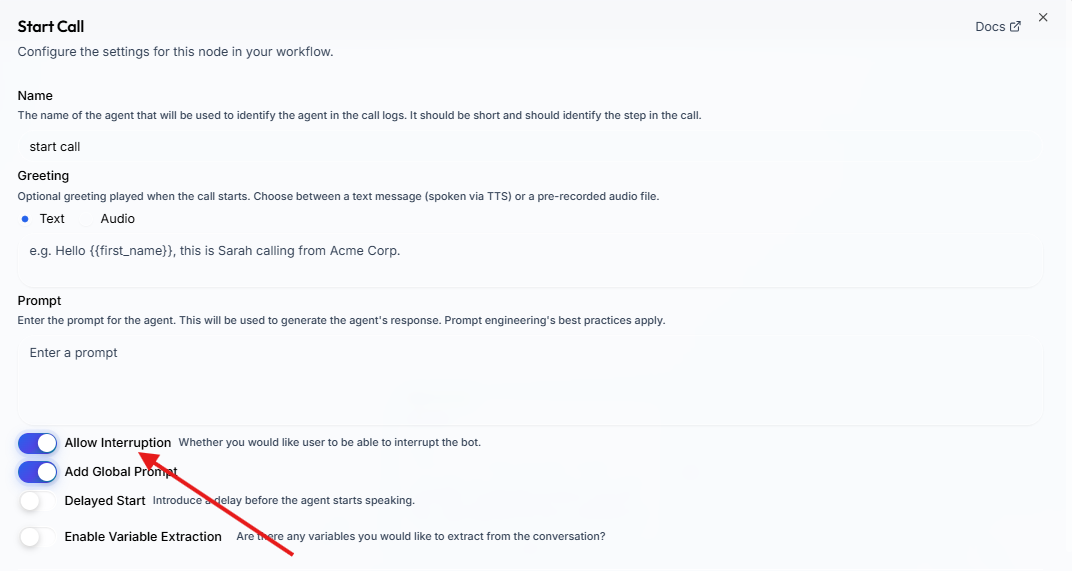
Control whether users can interrupt the bot while it is speaking by configuring the Allow Interruption toggle on each node.
Overview#
Interruption handling controls whether the user can "barge in" and interrupt the bot while it is speaking. This is configured per node in the workflow editor, giving you fine-grained control over conversation flow.
How It Works#
Each node in your workflow has an Allow Interruption toggle:
- Disabled (default) — The bot finishes its entire response before accepting user input. The user's microphone is temporarily muted while the bot speaks.
- Enabled — The bot stops speaking as soon as the user starts talking, and immediately processes their input. This creates a natural, conversational experience.
When to Disable Interruption#
Disabling interruption is useful when the bot needs to deliver a complete message without being cut off:
- Legal disclaimers — Ensure the full disclaimer is spoken before proceeding.
- Critical instructions — Step-by-step directions that lose meaning if partially heard.
- Greeting or introduction — Let the bot finish its opening before the user responds.
- Confirmation summaries — Read back important details (appointment times, order totals) in full.
When to Enable Interruption#
Keep interruption enabled for interactive conversation stages:
- Q&A or objection handling — Let the user jump in naturally.
- Open-ended discussion — Feels more human when either party can interject.
- Long responses — Allow the user to redirect if the bot goes off track.
Configuring Interruption#
- Open your workflow in the Voice Agent Builder.
- Select the node you want to configure.
- Toggle Allow Interruption on or off in the node settings panel.
- Save your workflow.
You can set different interruption behavior for each node. For example, disable interruption on your Start Node greeting but enable it on all subsequent Agent Nodes.
What the User Experiences#
| Interruption | Bot Speaking | User Speaks | Result |
|---|---|---|---|
| Enabled | Yes | Yes | Bot stops, processes user input |
| Disabled | Yes | Yes | Bot continues, user input is ignored until bot finishes |
| Either | No | Yes | User input is processed normally |
When interruption is disabled, the platform mutes the user's audio input while the bot is speaking. Once the bot finishes, the microphone is automatically unmuted and the user can respond normally.