Workflows & Agents
How conversation flows are defined in Paladin
In Paladin, what you see as an agent in the dashboard is called a workflow in the API. They are the same thing — a workflow is the underlying definition, agent is the product name for it.
The graph model#
A workflow is a directed graph — a set of nodes connected by edges.
graph LR
    A[Start Call] -->|Caller greets| B[Qualify Intent]
    B -->|Wants support| C[Support Agent]
    B -->|Wants sales| D[Sales Agent]
    C -->|Issue resolved| E[End Call]
    D -->|Demo booked| E
Nodes are the steps in the conversation. Each node has a prompt that tells the LLM what to say and do at that point.
Edges are the transitions between nodes. Each edge has a condition — a natural language description of when to move on. The LLM evaluates whether the condition has been met based on the conversation so far.
Node types#
| Type | What it does |
|---|---|
startCall | Entry point for telephony calls. The first thing the agent says when a call connects |
agentNode | An LLM-powered conversation step. The core building block |
globalNode | Defines instructions that apply throughout all agent nodes (e.g. tone, language, fallback behaviour) |
endCall | Terminates the call |
trigger | Entry point for API-triggered runs (non-telephony) |
webhook | Fires an HTTP request when reached — use for CRM updates, notifications, etc. |
qa | Runs automated quality analysis on the completed call |
Edges and transitions#
An edge connects two nodes and fires when its condition is satisfied:
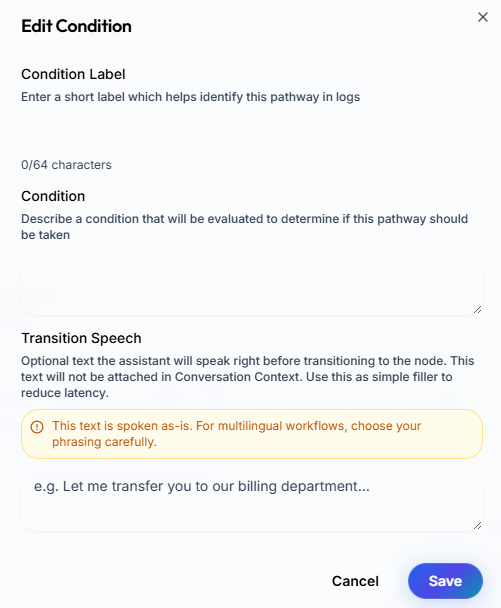
transition_speech is optional — if set, the agent speaks it before moving to the next node.
Versioning#
Every time you update a workflow's workflow_definition, Paladin saves a new version while keeping the history. The current version is always what runs. Old versions are retained for auditing.
Workflow concurrency#
Each workflow supports up to 10 concurrent active runs across calls, chats, campaigns, API-triggered runs, and other workflow activity. This limit is shared across all activity types for that workflow.
Creating workflows#
There are two ways to create a workflow via the API:
- From a definition — provide the full node/edge graph yourself. Best for programmatic generation.
- From a template — describe the use case in natural language and Paladin generates the initial graph using an LLM. Best for getting started quickly.
See the Workflow Definition Schema for the full field reference.