Context & Variables
How data flows into, through, and out of a conversation
Paladin has a simple data model for passing information through a call. Understanding it is key to building agents that feel personalised and to extracting useful results after a call.
The three context objects#
initial_context ──► Agent ──► gathered_context
                       │
                 [template variables](/voice-agent/template-variables)
(used in prompts)initial_context#
Data available to the agent before the call starts — the contact's name, account details, appointment information, anything the agent should know upfront. It can be set from several places:
- API trigger — pass it in the request body when calling
POST /public/agent/{uuid}orPOST /telephony/initiate-call - Campaign CSV — columns beyond
phone_numberautomatically becomeinitial_contextfields for each contact's call - Dashboard — set default template context variables on the agent, used when no external context is provided
{
  "phone_number": "+14155550100",
  "initial_context": {
    "customer_name": "Jane Smith",
    "plan": "premium",
    "renewal_date": "April 1"
  }
}
Template variables#
Values from initial_context are available in your agent's prompt using {{double_brace}} syntax.
You are calling {{customer_name}} about their {{plan}} plan,
which renews on {{renewal_date}}. Be friendly and confirm
whether they'd like to continue.
When the call starts, Paladin substitutes the values before sending the prompt to the LLM — so the agent speaks naturally as if it already knows the contact.
Fallback values#
If a variable might be missing or empty, use a pipe (|) to provide a default value:
Hello {{customer_name | there}}, we're calling about your {{plan | current}} plan.When customer_name is not set, the agent will say "Hello there" instead of leaving a blank. The syntax is:
{{variable_name | fallback_value}}If the variable is present and non-empty, the fallback is ignored and the actual value is used.
Default variables#
Built-in variables for current time and weekday, available in any prompt without setting up initial_context.
| Variable | Description | Example output |
|---|---|---|
{{current_time}} | Current time in UTC (or inferred timezone) | 2026-04-02 14:30:45 UTC |
{{current_time_<TIMEZONE>}} | Current time in the specified timezone | 2026-04-02 20:00:45 IST |
{{current_weekday}} | Current weekday name in UTC (or inferred timezone) | Thursday |
{{current_weekday_<TIMEZONE>}} | Current weekday name in the specified timezone | Thursday |
Replace <TIMEZONE> with an IANA timezone name such as Asia/Kolkata, America/New_York, or Europe/London.
Today is {{current_weekday}} and the current time is {{current_time_America/New_York}}.Telephony variables#
For telephony calls (inbound and outbound), Paladin automatically adds these variables to initial_context:
| Variable | Description | Example |
|---|---|---|
{{caller_number}} | The phone number that initiated the call | +14155550100 |
{{called_number}} | The phone number that received the call | +18005550199 |
For inbound calls, caller_number is the customer's number and called_number is your Paladin number. For outbound calls, it's the reverse — caller_number is your Paladin number and called_number is the customer's number.
You are speaking with the caller at {{caller_number}}.gathered_context#
Data the agent collects during the call. You configure what to extract in the agent node's extraction settings — each variable has a name, type, and a prompt that tells the LLM what to look for.
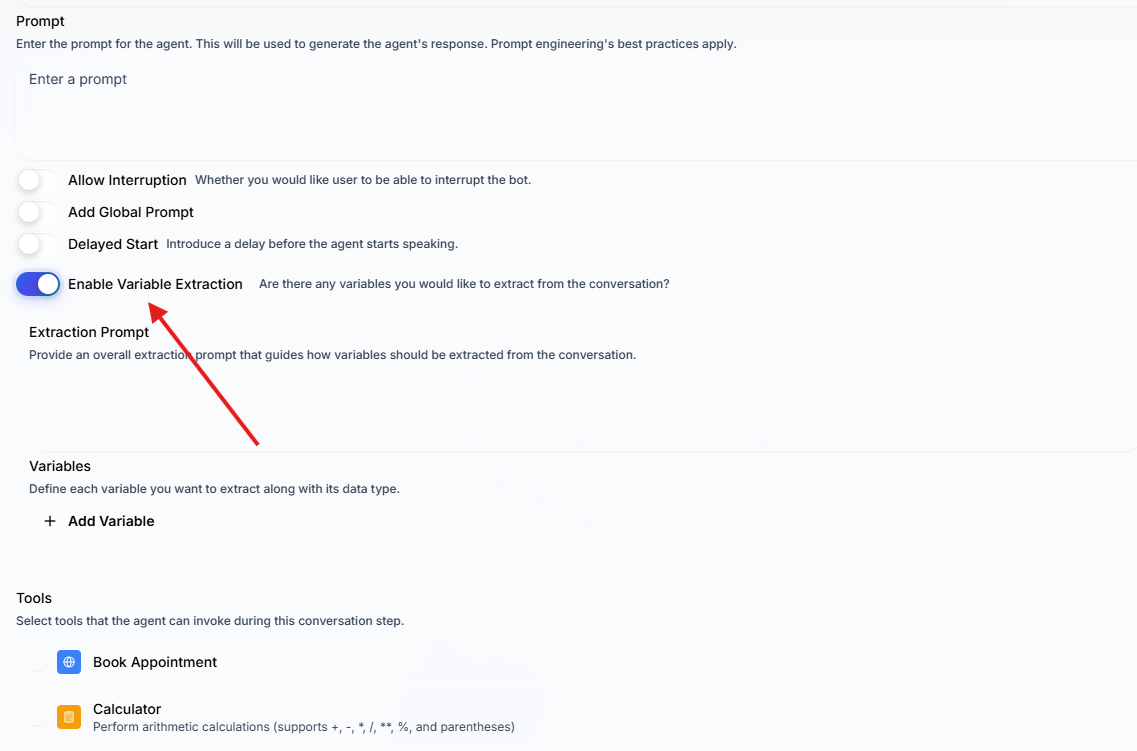
gathered_context is returned in the run record after the call completes and is available in webhook payloads for downstream processing.
Data flow example#
sequenceDiagram
    participant App as Your System
    participant Pal as Paladin
    participant LLM as LLM

    App->>Pal: initial_context: {customer_name: "Jane", plan: "premium"}
    Pal->>LLM: Prompt with {{customer_name}} and {{plan}} substituted
    LLM-->>Pal: Conversation response
    Note over Pal,LLM: Call progresses...
    Pal->>LLM: Extract: did the customer confirm renewal?
    LLM-->>Pal: gathered_context: {renewal_confirmed: true}
    Pal-->>App: Run record with gathered_context
Where variables are available#
| Location | Variables available |
|---|---|
| Agent node prompts | initial_context fields via {{variable_name}} |
| Edge conditions | Evaluated against the live conversation — no explicit variable syntax needed |
| Webhook payload templates | All context objects via {{initial_context.field}}, {{gathered_context.field}} etc. |
| Campaign CSV columns | CSV columns beyond phone_number become initial_context fields automatically |